Thursday, 21 May 2020

Akoranga Tuatoru - DFI

Kia Ora Everyone!


Day Three of our Digital Fluency Intensive PD! Blown away once again, by the mount of knowledge our facilitators know about Google and digital technology. Every session thus far has been very insightful and rewarding for myself as I am consistently learning more and more! Today we continued our journey towards understanding the Manaiakalani pedagogy of 'Learn, Create, Share'. The more I learn about Manaiakalani and 'Learn, Create, Share' the more I can see how  this teaching approach, will benefit my students.


Today our focus was about 'Media' and how we can use different aspects of media in our classrooms. Google Drawings, Google Slides and Youtube were also a huge part of today.  Although our Youtube tutorial was very insightful, I was unable to do the task due to the restrictions on my laptop. Hopefully admin makes the changes needed for me to trial Youtube in my classroom lessons.


This afternoon we broke off into small groups to focus on using different aspects of  Google Slides. I chose to attend a workshop about making 'Pick a Path' a teaching resources to create quizzes and stories. In the end our task was to either create a quiz or a story using Google Slides. I decided to create a quiz that will benefit our rūmaki students, it is about understanding when and where you would use 'au, ia, koe.' 


Have a go and see if you can crack my quiz!

#Please note it has been designed for use in a rūmaki reo classroom setting and is therefore in Te Reo Māori.

Thursday, 14 May 2020

Akoranga Tuarua - DFI

Kia Ora Koutou Katoa.

WOW! What can I say! Today, Thursday 14th May 2020, we had our second session on digital fluency with Manaiakalani. The session today was based around managing workflow. Very excited to see what this session had to hold as I am always interested in gaining new knowledge and tips to better manage my workflow.

The Manaiakalani team covered a variety of work related google extensions to assist with managing our workflow.

The PD/Tutorials that I was most interested in was the Google Keep app extension. I had no idea what it was about prior to the tutorial itself. It was interesting to know that you could easily take a photo of your written work, or a text from a book and the app will automatically format and adjust the image to a text form on the document. Im looking forward to using this app to collate all my notes I have from meetings and our discussions in the classroom.

Another PD/Tutorial I liked was the Taming Tabs tutorial. So many times when doing work on my laptop, I have a whole bunch of tabs opened. In this tutorial/PD Gerhard showed us the many ways you can organize your tabs. The tips that I have saved and will be actively using are as follows :
Pressing: ctrl-(number of the tab you are wanting) = that tab will appear.
Pinning your Tab, by right clicking your tab and pressing pin, will shrink your tab to the icon only.
I am be looking forward to trialing the following apps over the next few weeks to see which one better suits my style or work:

  • One Tab- temporarily close down all the open tabs and the create a list of tabs where you can revisit, restore and/or remove.
  • Great Suspender- Will put your tabs to sleep and reopen on request.
  • Tab Snooze- Allows you to snooze your tab and add a reminder to when you would like tab to pop up again.
  • Toby Mini- Organizing your tabs and creating store sessions to make the collection of tabs easily accessible.

The 'creating' task that had been set out for us today. Was to:

  1. In pairs, host and record a Meet conversation where you each reflect on your chosen blog post using the prompt and blog post on slide 1. Use screen share via Present Now  to show the group your post as you talk them through it.
  2. Select a blog post from one of the Manaiakalani Mail Outs linked  to discuss with your group. (Preferably select a child’s blog from the ‘Learners Learning’ section)

Questions and thoughts to drive your conversation: 

  1. What was the teaching design behind this post?
  2. What was the learner’s response ie the post content
  3. Who responded to the post and how did this support the learning experience or contribute more to the learning of the child?


Here is a screenshot of my recording: Arohamai due to some online difficulties, the recording had a lot of glitches.

Looking forward to our next session!

Thursday, 7 May 2020

Akoranga Tuatahi-DFI


Kia Ora koutou katoa,

Today, Thursday 7th May 2020, we had our very first session on digital fluency with Manaiakalani. What can I say! I came in to the session very nervous and excited to learn more about google and I did just that!.

Blown away at the history of Manaiakalani, I only knew it to be the umbrella that Kootuitui come under. But today I learnt that Manaiakalani started in 2006, and started with only twelve schools on the coast of Tamaki Makaurau. For the first four years of running this kaupapa they had little to no devices and managed to make it work, and now look where they are! It really goes to show collaborative and hard work really do pay off and in this case our whānau and tamariki are the ones reaping from it all. Ka Wani Kē!


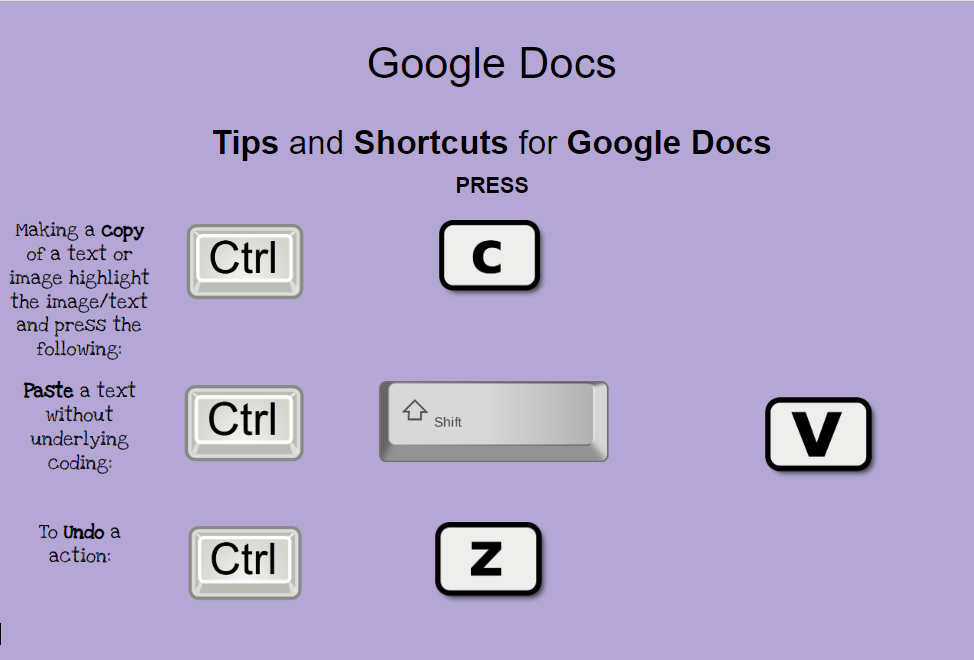
In one of our lessons today we learnt about the many ways we can use Google Docs i.e.
I created this poster on Google Docs, I only thought you could use Google Drawings to create posters or anything creative on Google. However, I was wrong and am very grateful to have learnt this new knowledge.

The other new knowledge I'll be taking away with me today is using 'Voice Typing' in Google Docs. This tool will be so beneficial when writing out reports and 'teacher work' when my fingers are over typing, I will also be interested to know whether this tool is accessible in Te Reo Māori as this will be very beneficial in my literacy program, as it will increase our students fluency. At this moment I only know this tool to be used as an English tool, I will need to find an extension where I can use this tool in Te Reo Māori.

Two key phrases/ideas I'm taking away with me today is...
1. Devices should be seen and used as a pencil.
2. Focusing on the simple things at the beginning of the year will mean a better flow throughout the year!

What a great day this has been! I look forward to my next akoranga with the Manaiakalani team.